
Description
Watcher of Realms is a fantasy RPG where you collect heroes and fight strategic battles to protect the realms. On this page you can top up W Gold directly to your account using just your User ID, so you can get the items and perks you need in-game and enjoy a better experience hassle-free.
Why Choose This Service?
- Direct top-up to your account with no password needed
- Fast delivery, usually within minutes
- A variety of packages to suit every need and budget
- Multiple secure payment methods
Choose the right W Gold package now, enter your details carefully, and complete your order in a few simple steps to get back to the game quickly.
FAQ
Where do I find my User ID in Watcher of Realms?
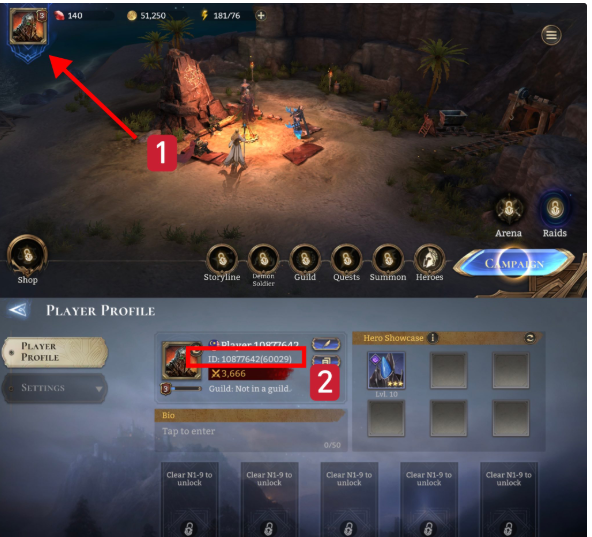
Log in, then tap the profile icon in the top-left corner, and your User ID and Server ID will be displayed.
What if I enter the wrong ID?
The top-up is processed to the ID you entered and cannot be reversed, so double-check your ID before paying.
Where do I find my server code?
Your Server ID appears on your profile page next to your User ID.
Reviews
Reviews here are from customers who actually completed their order — Be the first to rate after purchase.
method Usage
- Find your User ID: Log in, then tap the profile icon in the top-left corner, and your User ID and Server ID will be displayed.
- Choose the W Gold package that suits you from the list.
- Enter your User ID accurately in the designated field, then select the server your account plays on from the list.
- Review your order details, then complete payment with your preferred method.
- The W Gold will be added to your account automatically, usually within minutes, and you can check your balance in-game.
Note: Make sure your User ID and server is correct before paying, as top-ups cannot be reversed once processed.